

Dental marketing attributionA visitor’s photo, turned into a booked case.
End to end
Every stage on the same patient record.
Simulation
A patient sees the outcome
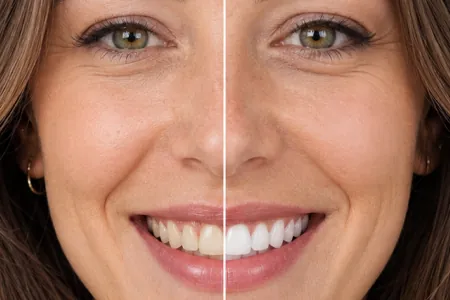
They take a photo on your site and get a clinically bounded preview of a treatment. No app, no appointment, no staff time.
Lead
Contact details captured
When they ask to book, they leave a name, a number and a good time to call. The request lands in your Bookings queue with the before and after attached.
Consult
The conversation starts warm
The patient arrives having already seen the result, so the consult starts with the plan.
Credit
Booking traced to source
Each request, and the consult your front desk marks scheduled, is credited to the simulation that started it and the campaign that produced the visit, per location.
What patients see, and what you see.
✓ Great lighting✓ Show teethWhat the patient sees
Your branding, your treatment names, your prices.
- 9/30/26NewMaya Rodriguezmaya.rodriguez@example.com(613) 555-0187Whitening / B1
- 9/30/26Call Back10/1, 10:30 AMPriya Shahpriya.shah@example.com(613) 555-0163StraighteningLeft voicemail. Asked about evening appointments.
- 9/29/26ScheduledTom Beckertbecker@example.com(613) 555-0128Whitening / BL2Booked for Tuesday 2:30 with Dr. Fournier.
- 9/29/26ScheduledDaniel Okoyed.okoye@example.com(613) 555-0174Veneers / NaturalConsult booked. Wants to hear about payment plans.
- 9/28/26Not InterestedChris Morgancmorgan@example.com(613) 555-0151Veneers / BrightGoing ahead elsewhere for now.
- 9/27/26Scheduled—Ana Limaana.lima@example.com(613) 555-0139Braces / CeramicBooked Oct 3 with Dr. Raman.
What the practice sees
Every simulation, who ran it, and what happened next.
Works the same way for every smile treatment:
Dental marketing toolsRun the campaign from the same dashboard.

Media kits with QR codes
Posters, in-clinic and tabletop stands, business cards and a waiting-room screen image, in five looks with your logo, color and fonts. Each piece gets its own QR code, so you can see which one people scan, and a kit can point somewhere new without reprinting.
A link for every campaign
Make as many links and website buttons as you run campaigns. Each can open straight on one treatment, carry its own button text, and send bookings to our form, your own booking page or a phone call.
Offers with an end date
Set your price and a discount for each treatment, ongoing or between two dates. A summer whitening offer at 20% off shows patients the reduced price beside your usual one and the days left, then ends on its own. Promotion Impact shows whether it moved bookings.
Scope
What we deliberately are not.

Not a website vendor
Keep your site and your agency. We add one element to the page.
Not a practice management system
Your PMS stays the source of truth for clinical records.
Not a CRM
Requests wait in one Bookings queue, each marked new, call back, scheduled or not interested.
Not a diagnosis
A simulation is a marketing preview. The clinician decides what is possible.
Rolling out across a group? See how DSO rollout works